Clash detection, driven by conversation
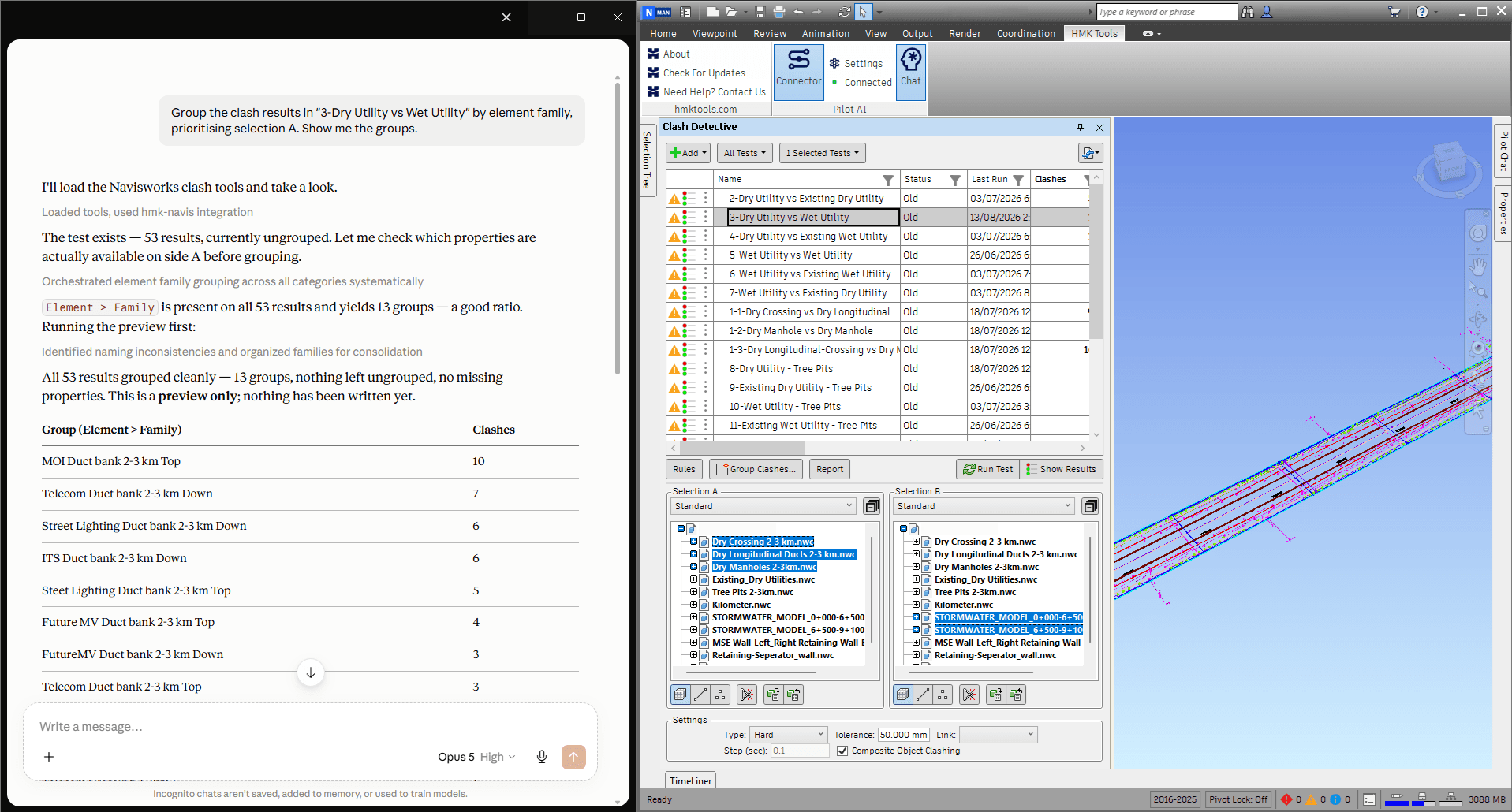
Clash Detective is where a coordination week is won or lost, and it is also where the clicking is worst. 22 of the 95 actions are clash actions, covering the whole lifecycle rather than a demo slice of it:
- Create and configure clash tests — tolerance, type, and the two selections on each side.
- Run them, individually or in batch, and read the result counts back.
- Triage: group results, assign status, add comments, and walk the list without leaving the conversation.
- Capture a viewpoint and an image for each result, so a report shows the problem instead of describing it.
- Calculate minimum clearance between two selections before anything is modelled.
- Write the report yourself — HTML, CSV or JSON — instead of fighting the built-in exporter.
Clash Detective is a Navisworks Manage feature, so these actions appear only when the host is Manage. The rest of the suite works in Simulate too.
4D and the TimeLiner schedule
Fourteen actions cover the 4D side: create and edit tasks, link geometry to them, and — the one that actually saves a day — rule-based bulk auto-attach, which maps hundreds of objects to tasks by rule with a dry run first. Plus task types, simulation appearances, date roll-up, CSV export, and a dated progress snapshot image you can drop straight into a report.
Federation, sets and viewpoints
A coordination model is a moving target. The assistant can list what is in the federation, append and remove files, refresh or overwrite them, and report what each model contributes. It authors search sets and selection sets — including the folder structure — so the naming convention your team agreed on actually gets followed.
Viewpoints round it out: create them with captured overrides and comments, round-trip the camera, set clipping, and control transparency, hide, isolate and background. Quantification takeoff is covered too, for pulling quantities out of the model.
Two ways to use it
Inside Navisworks. Pilot Chat is a dockable panel in the application. Ask in plain language and the work happens in the model you have open.
From your own LLM. Connect Claude, ChatGPT, Cursor or Google Antigravity through a local Model Context Protocol (MCP) server — one click, no config file to hand-edit and nothing else to install. The server is off by default, binds to localhost, and stops when you say so.
Working in Revit, AutoCAD or Civil 3D as well? The same suite covers them — Revit MCP and AutoCAD & Civil 3D MCP. One licence covers every product on the same machine.
What you can ask
- “Run every clash test and tell me which ones got worse since last week.”
- “Group the structural-vs-MEP clashes by level and export an HTML report with images.”
- “Attach these 400 objects to the schedule by rule, dry run first.”
- “Append the new architectural NWC and tell me what changed in the federation.”
- “Make a search set for every pipe over 200 mm and put it in the MEP folder.”
Frequently asked questions
Is there an MCP server for Navisworks?
Autodesk does not publish one: as of September 2026 its official MCP servers cover Revit, AutoCAD and Civil 3D, but not Navisworks. HMK Tools runs an MCP server inside Navisworks Manage and Simulate 2023–2027 with 95 actions — clash tests, TimeLiner, sets, viewpoints and the federation — and connects it to Claude, ChatGPT / Codex, Cursor or Google Antigravity in one click.
Can I use AI in Navisworks?
Yes, two ways. Pilot Chat is an AI panel docked inside Navisworks: ask in plain language and it works in the model you have open. Or connect your own assistant over MCP. Either way it runs and triages clash tests, builds the 4D schedule and manages the federation, and nothing leaves your machine.
Can AI run clash detection in Navisworks?
Yes. HMK Tools exposes 22 clash actions inside Navisworks: create and configure clash tests, set the two selections, run them, group and triage results, assign status and comments, capture a viewpoint and an image per result, calculate minimum clearance, and write an HTML, CSV or JSON report. The assistant drives the real Clash Detective in the model you have open — not an export.
Does it work on a federated model?
Yes, that is the point. It can list what is in the federation, append and remove files, refresh and overwrite them, and report on each model's contribution — so a coordination round can be prepared and reported without clicking through the Selection Tree.
Can it build the 4D TimeLiner schedule?
Yes. 14 TimeLiner actions cover task CRUD, linking geometry to tasks, rule-based bulk auto-attach, task types, simulation appearances, date roll-up, CSV export, and a dated progress snapshot image.
Which Navisworks versions are supported?
Navisworks Manage and Simulate 2023 through 2027. Each release gets a build compiled against its own API version, and a release is only claimed once the tools have actually been run inside it.
Does my model leave my computer?
No. The assistant runs inside Navisworks and the MCP server is bound to localhost, so nothing is reachable from outside the machine. Your models are never uploaded to HMK Tools.
How does it connect to Claude?
One click. Pick your client — Claude Desktop, Claude Code, ChatGPT / Codex, Cursor or Google Antigravity — and HMK Tools writes the connection for you, preserving any other MCP servers you already have. Nothing else needs installing. You can also skip the external client entirely and use the Pilot Chat panel docked inside Navisworks.
Is clash detection available in Navisworks Simulate?
No — Clash Detective is a Navisworks Manage feature, so the clash actions are offered only when the host is Manage. Everything else, including TimeLiner, sets, viewpoints and federation, works in both Manage and Simulate.
Put Claude to work on your coordination model.
Free for 14 days — every tool, no card required.
Navisworks, Revit, AutoCAD and Civil 3D are trademarks of Autodesk, Inc. HMK Tools is not affiliated with Autodesk. Learn more at hmktools.com.