HMK Tools logoHMK Tools

Explorar

ToolboxLos 28 add-ins, por categoríaPilot AIChat en la aplicación o por MCPDescargarUn instalador, los cuatro programasDocumentaciónCómo se usa, paso a pasoPruebe toda la suite30 días, todas las herramientas, sin tarjeta.Probar gratis

AI y MCP

Revit MCPConecte su LLM a RevitAutoCAD y Civil 3D MCPControle sus dibujos desde su LLMNavisworks MCPInterferencias y 4D desde su LLMComparar opciones MCPCómo se sitúa HMK frente al restoAI en RevitUna guía práctica
PreciosContacto
EnglishTürkçeDeutschEspañol
Iniciar sesiónProbar gratis
Documentation
Start here
  • Getting started
  • Connect your AI client
  • How to ask
By product
  • Revit
  • AutoCAD & Civil 3D
  • Navisworks
When it goes wrong
  • Troubleshooting
Looking for what a specific tool does? The toolbox lists every one of them.
By product

AutoCAD & Civil 3D

136 actions across AutoCAD 2021–2027 and Civil 3D 2021–2027. The Civil tools appear automatically when the add-in is running inside Civil 3D; in plain AutoCAD you get the AutoCAD set.

AutoCAD — 83 actions

  • Drawing context & query12
  • Geometry creation8
  • Modification11
  • Layers8
  • Blocks, attributes & data12
  • Text & dimensions11
  • Layouts, plotting & export7
  • Drawing management6
  • Dynamo7
  • Code execution1

Civil 3D — 53 more

  • Surfaces10
  • Alignments6
  • Profiles6
  • COGO points6
  • Corridors5
  • Pipe networks5
  • Labels & styles4
  • Feature lines3
  • Sites & parcels3
  • Sample lines2
  • Project context2
  • Code execution1

Full descriptions are in the toolbox entry.

Walkthrough: layer and standards cleanup

A drawing that came from outside your office almost never matches your layer standard. Start by seeing what you actually have:

“List every layer with how many objects are on it, and flag the empty ones.”

Then act on the answer — rename to your standard, merge duplicates, set colours and line weights, freeze what you do not need. Because it works on the open drawing, you can watch it happen.

Walkthrough: text and attribute edits at scale

Find-and-replace across text, mtext and block attributes is one of those jobs that is trivial for ten objects and miserable for a thousand.

“Replace ‘REV A’ with ‘REV B’ in every titleblock attribute across all layouts, and tell me how many you changed.”

Walkthrough: a surface and a profile

In Civil 3D the assistant can build the objects, not just report on them.

“Create a TIN surface from the points on layer TOPO, then create an alignment from the polyline I have selected and cut a surface profile along it.”
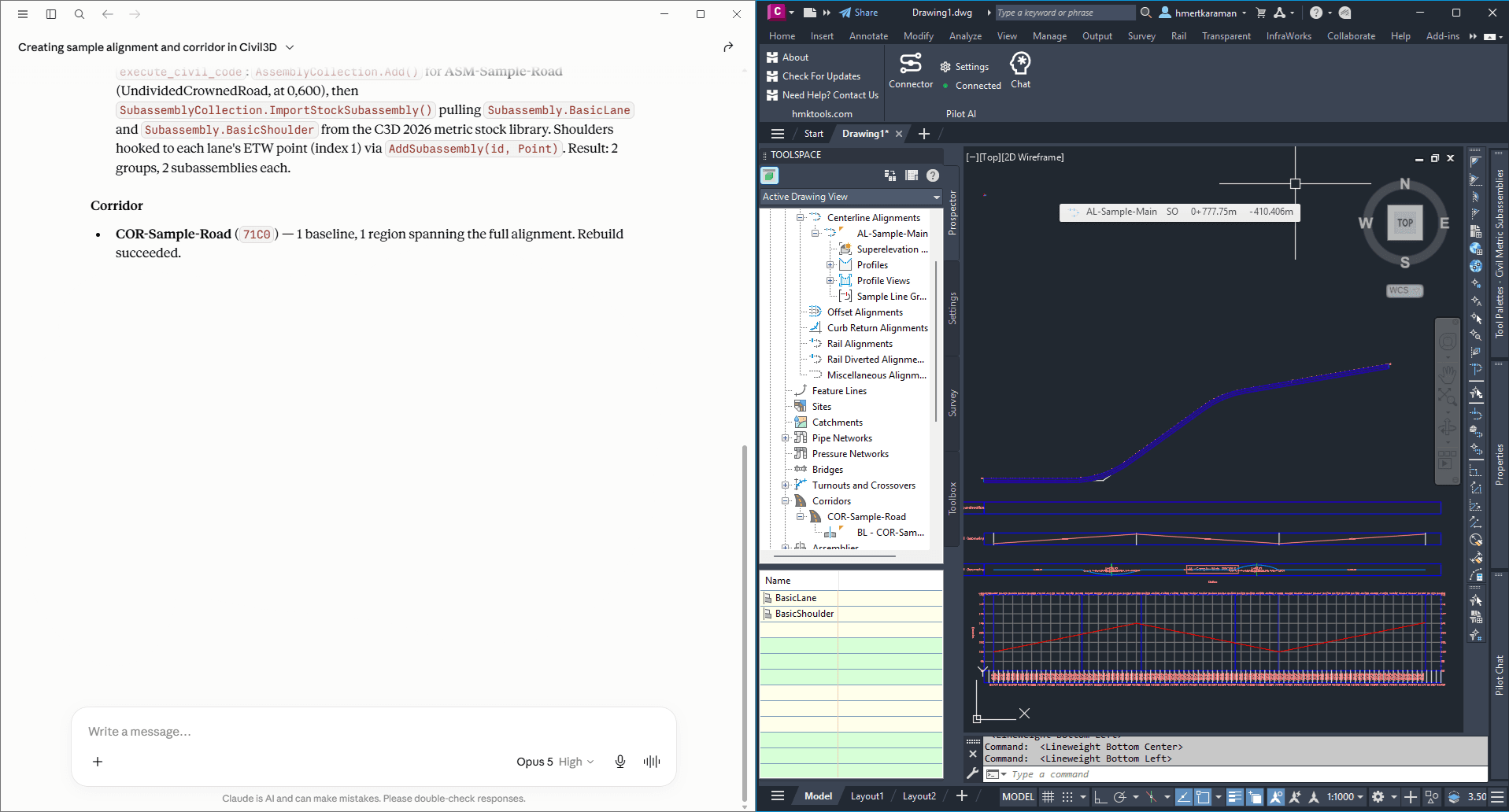
A Civil 3D corridor produced from a conversation with the assistant.
Civil 3D output driven from the chat panel — the objects are real Civil objects, not a drawing of them.
Corridors need an assembly first
A corridor cannot be built without an assembly to apply, so create or name the assembly before asking for the corridor. If you ask without one, the assistant will tell you rather than build something empty.

Walkthrough: plotting

Layout and plot work is well covered — list layouts, set the current one, and plot to PDF.

“Plot every layout except the model tab to a single PDF in this folder, using our A1 page setup.”

Which host am I in?
Ask “what can you do here?” and the answer differs between AutoCAD and Civil 3D — that is the fastest way to confirm the Civil tools are live in the session you are in.
HMK Tools logoHMK Tools

Add-ins con AI para Revit, AutoCAD, Civil 3D y Navisworks.

Producto

  • Toolbox
  • Pilot AI
  • Descargar
  • Autodesk App Store

AI y MCP

  • Revit MCP
  • AutoCAD y Civil 3D MCP
  • Navisworks MCP

Recursos

  • Documentación
  • AI en Revit
  • Novedades

Empresa

  • Contacto
  • Precios
  • Probar gratis
  • Iniciar sesión
  • info@hmktools.com

© 2026 HMK Tools. Todos los derechos reservados.

PrivacidadTérminosReembolsosPara Revit, AutoCAD, Civil 3D y Navisworks