HMK Tools logoHMK Tools

Explore

ToolboxAll 28 add-ins, by categoryPilot AIChat in the app, or over MCPDownloadOne installer, all four hostsDocumentationHow to use it, step by stepTry the whole suite30 days, every tool, no card.Start free trial

AI & MCP

Revit MCPConnect your LLM to RevitAutoCAD & Civil 3D MCPDrive drawings from your LLMNavisworks MCPClash and 4D from your LLMCompare MCP optionsHow HMK stacks up against the restAI in RevitA practical guide
PricingContact
EnglishTürkçeDeutschEspañol
Sign inStart free trial

Add-ins & AI for Revit, AutoCAD, Civil 3D & Navisworks

The tools that should always be there.

28 add-ins for the repetitive work, plus an AI assistant that runs inside the application you already have open.

Start free trialWatch demo
5.0on the Autodesk App Store
FOUR APPLICATIONS, ONE LICENCE
The Pilot Chat panel docked inside Revit, offering prompts to inspect and edit the model
Revit
102 actions
An alignment and its profile views in Civil 3D, created by Pilot AI from one sentence
AutoCAD & Civil 3D
136 actions
Clash Detective in Navisworks with a list of clash tests and their results
Navisworks
94 actions
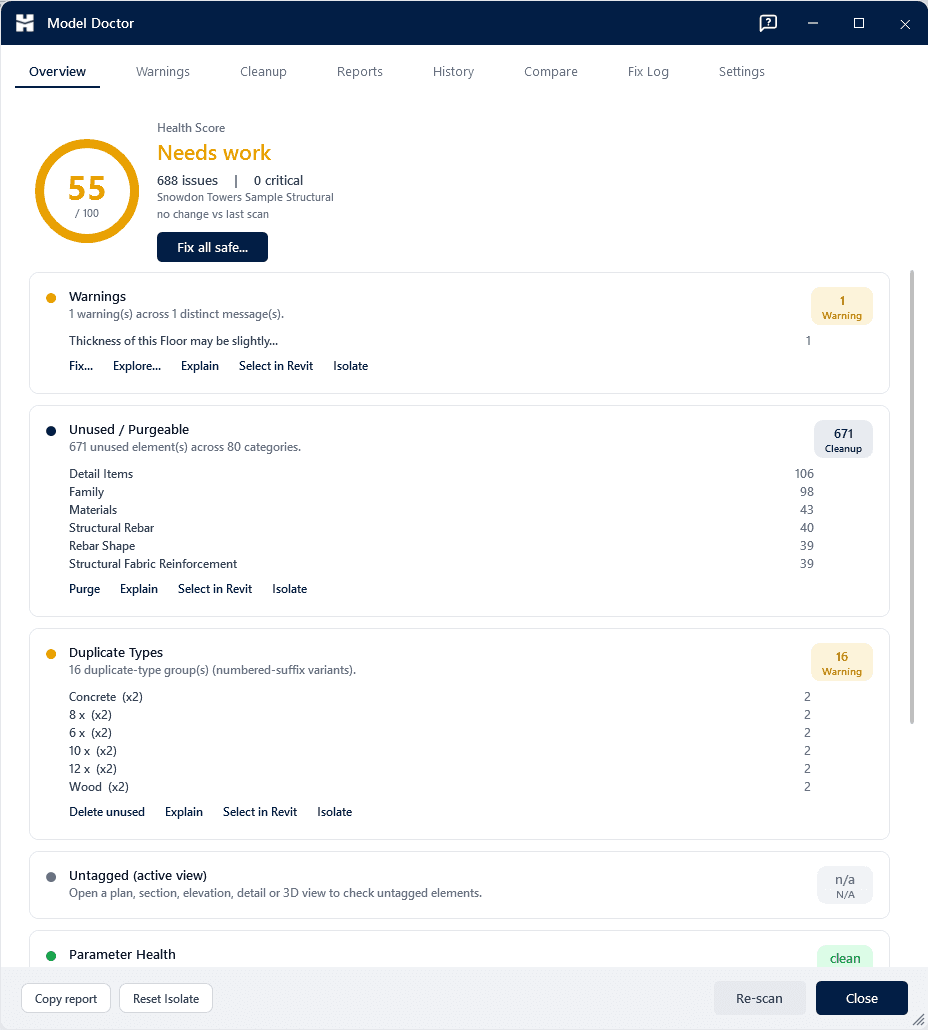
Model Doctor showing a health score out of 100 and the findings behind it
Toolbox
28 add-ins
add-ins
28
add-ins
·
AI actions
330+
AI actions
·
versions
2023–27
versions

01The toolbox

One toolkit. Every part of the workflow.

A few of the standouts below — 28 tools in all, from parameter automation to modeling, documentation, and export.
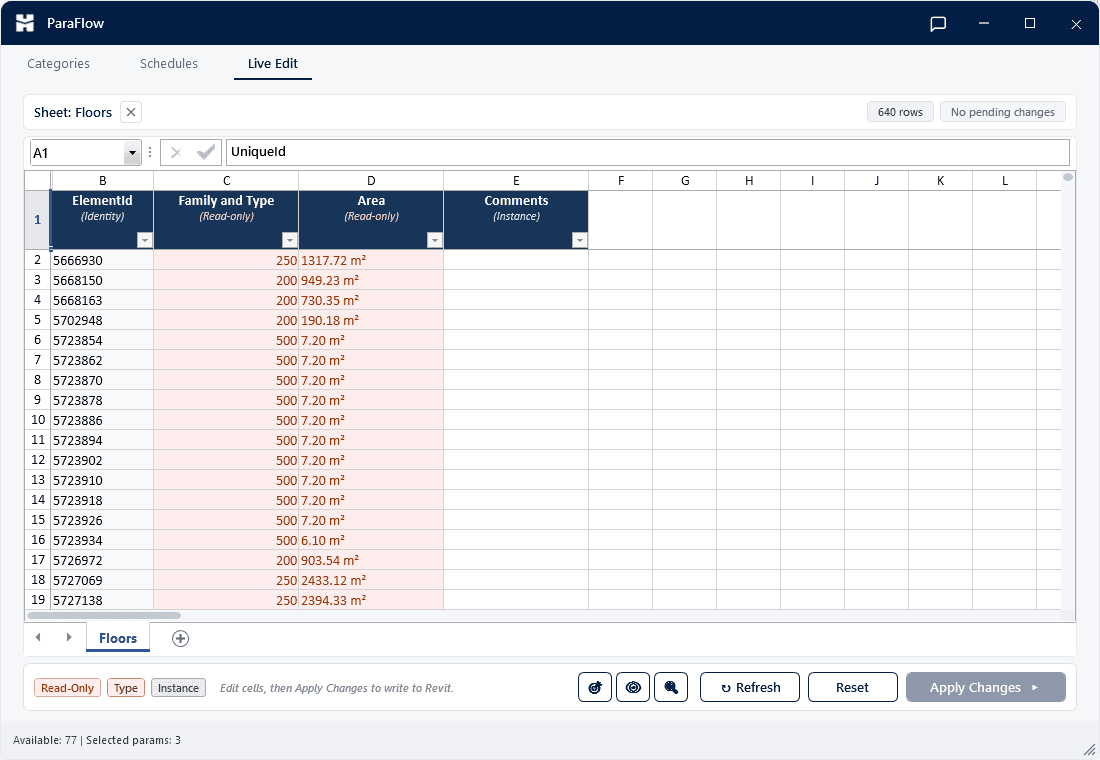
ParaFlow — Two-way parameter sync between Revit and Excel.
Data & Parameters

ParaFlow

Two-way parameter sync between Revit and Excel.

Model Doctor — Scan, score, and heal your Revit model.
Quality

Model Doctor

Scan, score, and heal your Revit model.

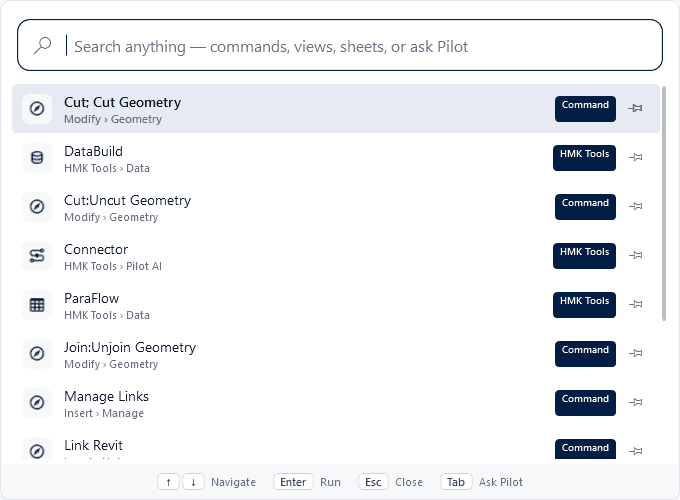
Compass — A command palette for Revit — find and run anything in seconds.
Visualize & Export

Compass

A command palette for Revit — find and run anything in seconds.

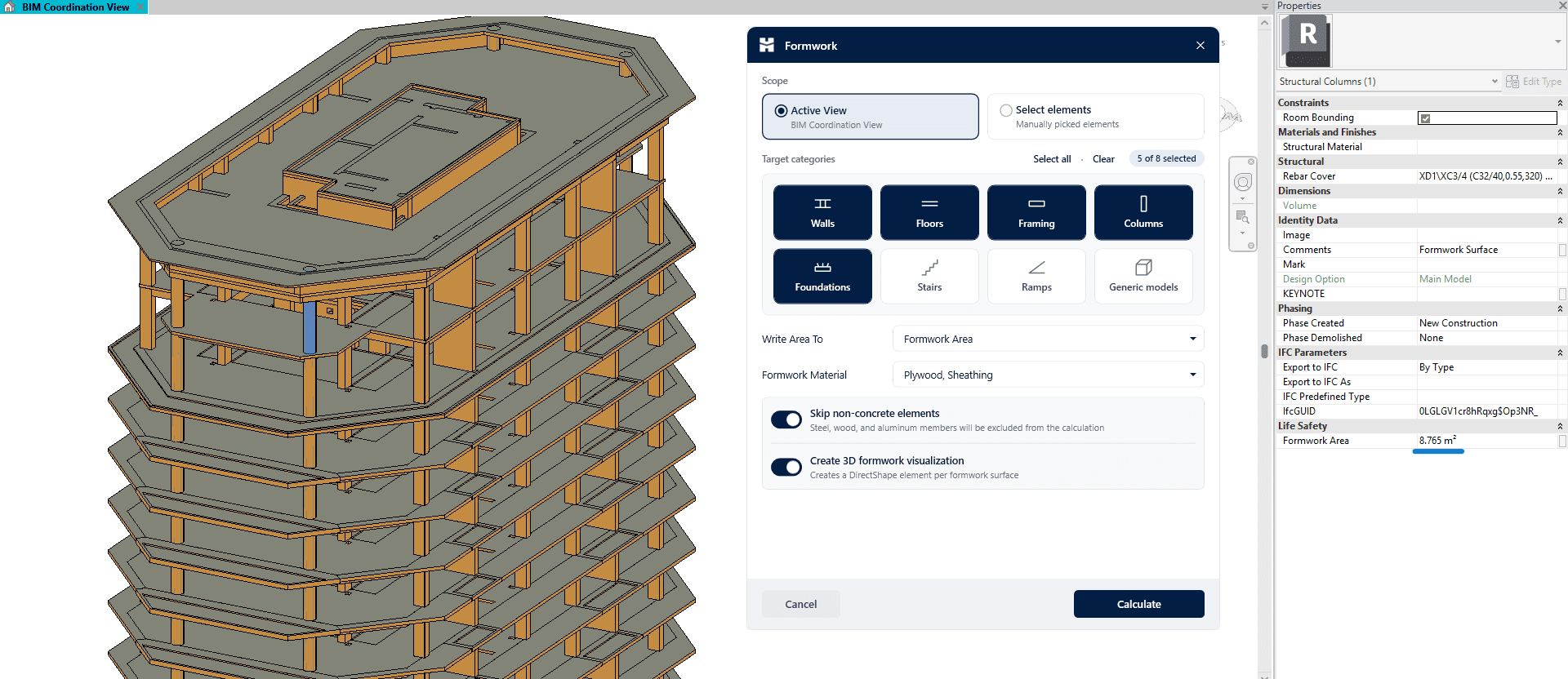
Formwork — Rule-based formwork areas for structural elements.
Structural

Formwork

Rule-based formwork areas for structural elements.

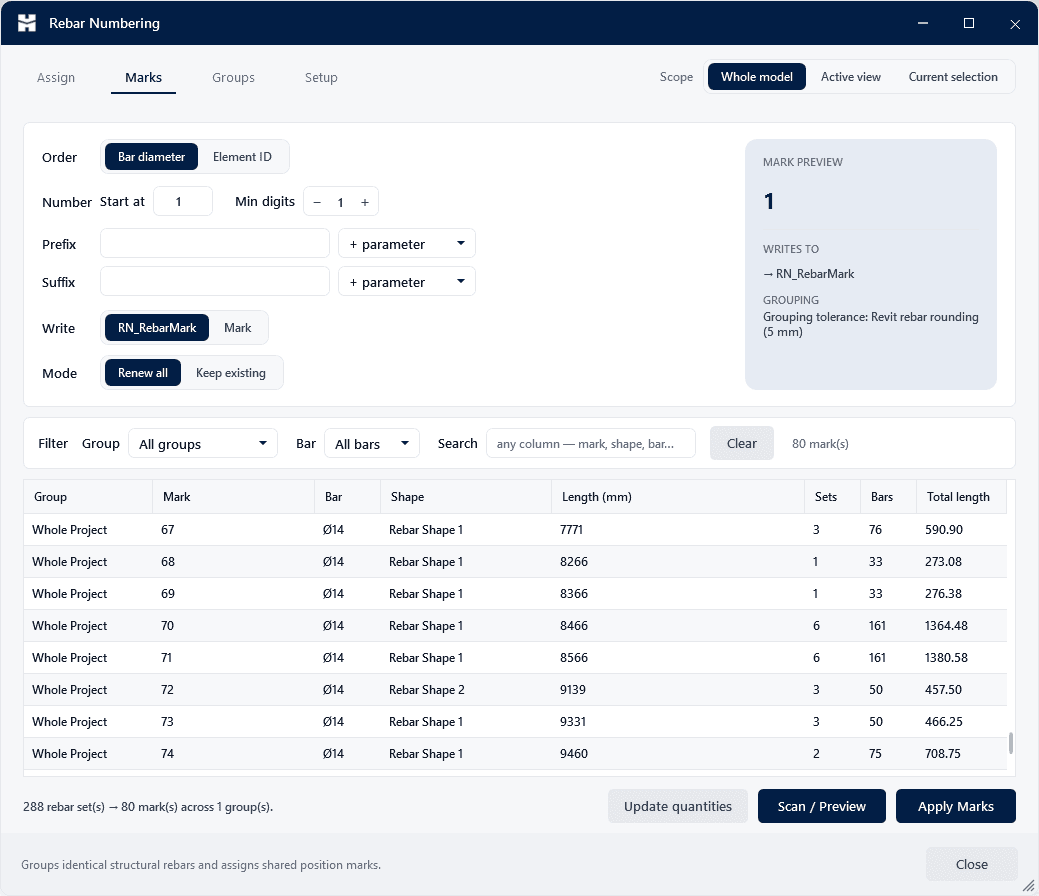
Rebar Numbering — Automatic position marks for identical rebars.
Reinforcement

Rebar Numbering

Automatic position marks for identical rebars.

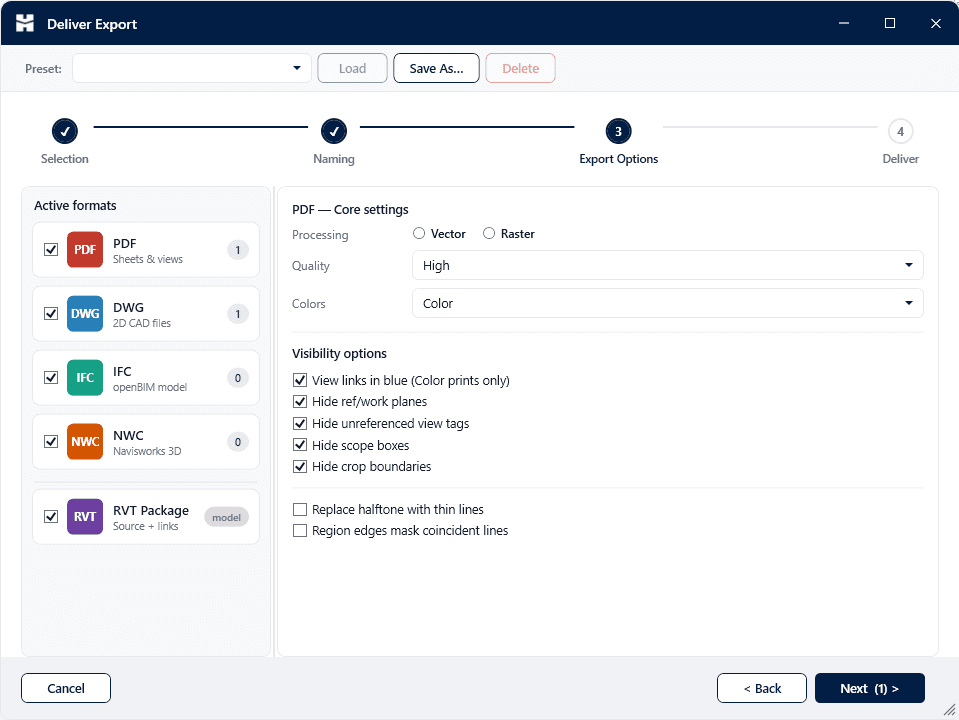
Deliver — Batch export to PDF, DWG, IFC & NWC.
Visualize & Export

Deliver

Batch export to PDF, DWG, IFC & NWC.

Explore all 28 tools

02Pilot AI

Your design tools, driven by AI.

Two ways in: a panel inside the application, or your own LLM driving it through a secure local bridge. Same tools either way.

Pilot Chat, inside the app

A dockable panel in all four applications. Ask about your model, run audits, automate edits — without leaving the app.

  • Docked in all four applications
  • Analyze, automate, and audit your model
  • Bring your own API key

MCP Bridge to your LLM

Connect Claude, ChatGPT, Cursor or Antigravity. Your LLM gains 330+ real actions, all executed safely on your machine.

  • 330+ actions across Revit, AutoCAD, Civil 3D & Navisworks
  • Runs locally — your files never leave your PC
  • One-click setup — nothing else to install
Claude Desktop · connected to Revit via Pilot AI

you ▸ Tag all the doors in the current view and put it on a new sheet.

pilot ▸ Running tag_all_in_view(category: Doors)… tagged 38 doors.

pilot ▸ Running create_sheet + place_view_on_sheet… created sheet A-103.

pilot ▸ Done in 2.4s.▋

get_selected_elements()bulk_set_parameter()create_sheets_for_levels()run_clash_check()auto_dimension_grids()tag_all_in_view()resolve_warning()create_schedule()create_polyline()insert_block()plot_to_pdf()list_alignments()sample_surface_elevation()list_pipe_networks()run_clash_test()group_clash_results()create_timeliner_task()publish_nwd()get_selected_elements()bulk_set_parameter()create_sheets_for_levels()run_clash_check()auto_dimension_grids()tag_all_in_view()resolve_warning()create_schedule()create_polyline()insert_block()plot_to_pdf()list_alignments()sample_surface_elevation()list_pipe_networks()run_clash_test()group_clash_results()create_timeliner_task()publish_nwd()
How Revit MCP works →How AutoCAD & Civil 3D MCP works →How Navisworks MCP works →

03In action

See it in action

HMK Tools at work — from the Pilot AI assistant to one-click batch delivery.

04Pricing

Start free. Buy when you're ready.

One plan, every tool — try it all free for 30 days.

HMK Tools — Full Suite

Free for 30 days

then a simple yearly license

  • Every module — 28 tools
  • Pilot AI: in-app chat in all four + 330+ AI actions
  • Revit, AutoCAD, Civil 3D & Navisworks support
  • 1 machine per license
  • Full 30-day free trial
  • Free updates & new tools for a year
  • Email support
Start 30-day free trialSee pricing

No credit card required to start your trial.

05Questions

Frequently asked questions

Revit 2023–2027, plus AutoCAD and Civil 3D 2021–2027, and Navisworks Manage and Simulate 2023–2027. The installer detects your installed versions and configures each one automatically.

HMK Tools runs locally inside your Autodesk apps. Licensing uses a secure server check and nothing about your models or drawings is uploaded. Pilot AI only sends what you explicitly ask it to.

Pilot AI is bring-your-own-key: connect your own API key for the in-Revit assistant, or use the MCP bridge with an LLM you already have, like Claude Desktop. HMK Tools adds no separate AI fee — you stay in control of your AI usage and costs.

Each license activates on a single machine. If you change computers, you can release and re-activate your license from your account dashboard.

Ready to speed up your design workflow?

Install in minutes, try every module free for 30 days.

Start free trial
HMK Tools logoHMK Tools

AI-powered add-ins for Revit, AutoCAD, Civil 3D & Navisworks.

Product

  • Toolbox
  • Pilot AI
  • Download
  • Autodesk App Store

AI & MCP

  • Revit MCP
  • AutoCAD & Civil 3D MCP
  • Navisworks MCP

Resources

  • Documentation
  • AI in Revit
  • Changelog

Company

  • Contact
  • Pricing
  • Start free trial
  • Sign in
  • info@hmktools.com

© 2026 HMK Tools. All rights reserved.

PrivacyTermsRefundsFor Revit, AutoCAD, Civil 3D & Navisworks